

How to Integrate AI into Document Workflows
Most document-heavy workflows still require people to manually read, extract, validate, and transfer information between systems. AI document processing can automate much of this work by turning documents into structured data that business applications and workflows can use. However, extraction alone isn’t enough. A practical solution also needs to account for validation, business rules, integrations, approvals, and exceptions. In this guide, we’ll explain how to integrate AI into document workflows, where it adds value, and where human review still makes sense.
AI document processing, often called intelligent document processing (IDP), is the use of technologies such as optical character recognition (OCR), machine learning, document understanding, and sometimes large language models (LLMs) to extract and process information from documents.
Traditional OCR mainly answers the question: "What text is on this page?"
AI document processing can go further: “What does this information represent, and what should happen to it next?”
For example, an invoice-processing system might identify:
The extracted information can then become structured data and move into another application. Microsoft’s Azure Document Intelligence, for example, combines OCR with document-understanding capabilities to extract text, tables, structure, and key-value pairs. It provides prebuilt models for common document types such as invoices and receipts, as well as custom models for business-specific documents. That distinction matters because the ultimate business goal is rarely to make AI “read PDFs.” It's usually to reduce the manual work required to move information from documents into business processes.
A common mistake is to think about document AI as one model sitting between an inbox and a database. Real workflows usually contain several stages:
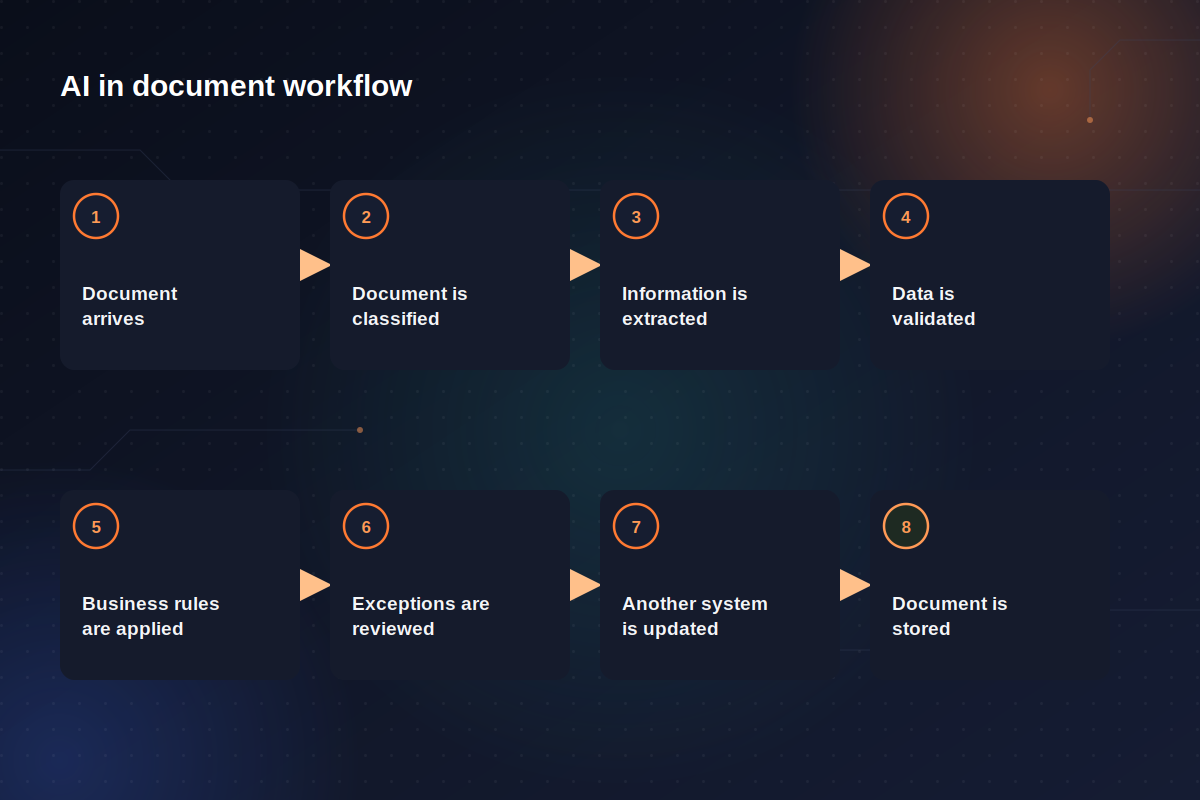
AI may handle some of those stages, while traditional automation may handle others.
For example, in an accounts payable workflow, invoices arrive through a shared mailbox. AI identifies the document as an invoice and extracts the supplier, invoice number, date, PO number, VAT, line items, and total.
Then, a workflow checks whether the supplier exists in the ERP and whether the PO number is valid. An invoice below a defined threshold might move automatically to the next step, while an invoice with a missing PO or unusual amount is routed to an employee.
After approval, the validated data is sent to the accounting system and the original invoice is archived.
As you can see, AI is important here, but it is only one part of the architecture. That’s why successful document automation projects usually combine AI for interpretation with workflow automation for execution.
Pick one document type and trace it from arrival to completion. For example:
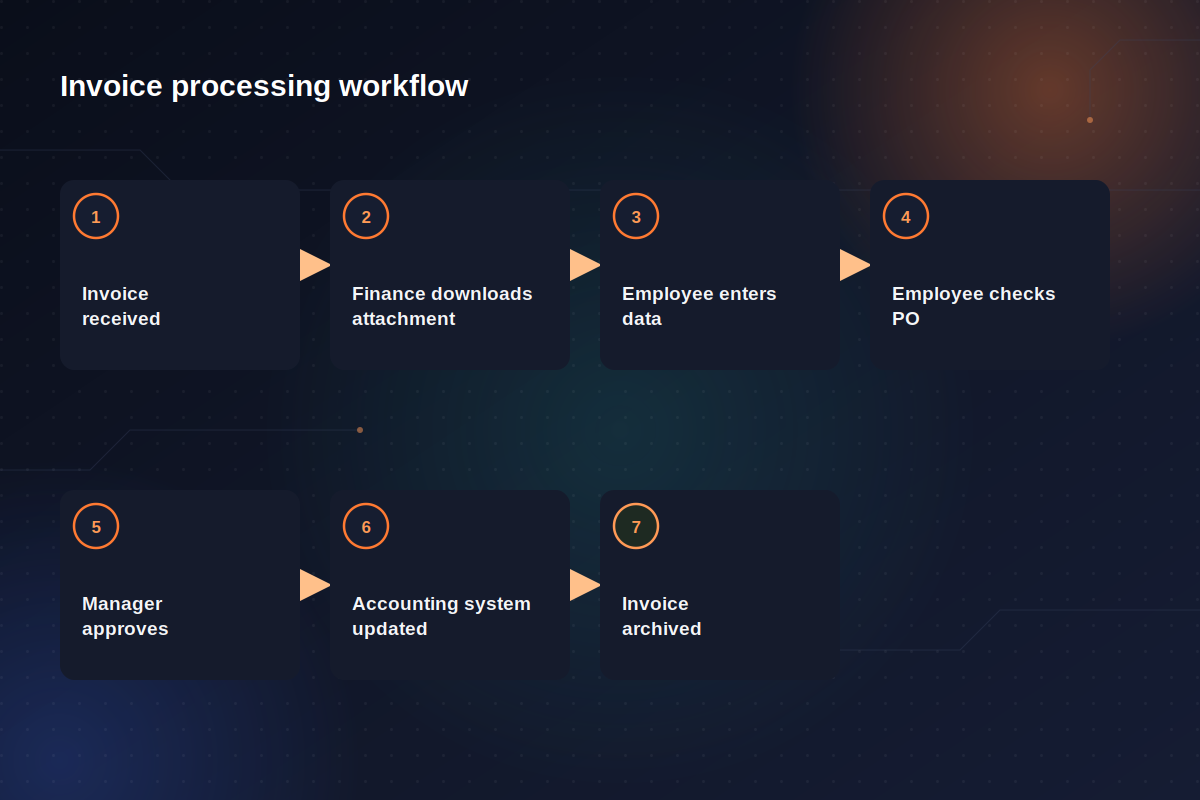
Then ask:
Bottom line: This approach prevents a common implementation problem: automating one manual task while leaving the surrounding bottleneck untouched.
The rule of thumb here is to avoid starting with “extract everything.” Instead, start with the fields that influence the business process.
For example, in an invoice, perhaps you only need data like supplier, invoice number, date, PO number, etc.
Bottom line: Every additional field introduces another extraction result that may need validation, storage, and maintenance. A narrower extraction scope is often easier to test and more useful operationally.
Not every document requires a custom AI solution:
Extracting information from a document doesn't automatically make it ready for use. Before the data moves to another system or triggers the next step in a workflow, it often needs to be validated against business rules, existing records, or other data sources.
These checks can include identifying duplicates, matching extracted information with records in an ERP or CRM, checking calculations, or determining whether an approval is required. The exact validation logic depends on the document and the business process around it.
Importantly, most of this validation doesn't require AI. When the rules are already known, deterministic logic is usually more reliable and easier to control. AI is better suited to tasks that require interpretation, such as understanding an unfamiliar document or extracting information from unstructured content.
Bottom line: A well-designed document workflow therefore combines both approaches: AI interprets the document, while conventional business logic validates the result and determines what happens next.
Don't design the extraction system around the assumption that every result will be correct because document quality may vary, some fields can be missing, or handwritten notes may appear.
A better design is led by a question: "What should happen when the system is uncertain?"
You can then create rules such as:
Bottom line: A reliable document workflow should account for uncertainty rather than assume every extraction will be correct. Clear confidence thresholds and exception rules allow routine documents to move automatically while directing uncertain cases to human review.
Human review isn't evidence that automation failed, it can (and should) be part of the design. For instance, Microsoft’s reference architecture for AI document processing includes an explicit human-review stage where users can approve, reject, or correct extracted data before the process continues.
Therefore, it's better not to seek opportunities to remove people from specific workflows but focus on cases that require human input and attention.
Bottom line: If AI and deterministic validation can process routine documents, employees can focus on exceptions: unusual amounts, missing information, mismatched records, contractual ambiguity, or cases with low confidence. That's often a more realistic automation target than trying to eliminate manual review completely.
Extracted information only becomes valuable when something can use it. Depending on the business, the destination might be Dynamics 365, an ERP or CRM, Microsoft Dataverse, SharePoint, or other.
This integration layer often determines whether a document AI project becomes operational or remains a demo. A technically impressive model returns accurate structured data is still incomplete if someone has to retype those fields into the ERP by hand.
Bottom line: A complete AI document workflow should move validated data directly into the systems where the business process continues, rather than creating another manual handoff.
Here at Univisia, much of our work is built around the Microsoft ecosystem. Lately, we've seen that AI document processing has become significantly easier to prototype. Microsoft provides prebuilt and custom document models, Power Platform offers lower-code automation paths, and Azure services can support more customized document and RAG architectures.
On the surface, AI can extract information easily enough. However, the harder issue is whether you can turn that capability into a reliable business process. That requires understanding where documents come from, which information matters, how results should be validated, where human judgment belongs, and how data should reach the systems of record.
So before selecting an AI model, pick one document-heavy process and map it end to end. You may discover that some steps need AI, some need conventional automation, and others should remain human. That's usually a much stronger foundation for document automation than trying to make AI handle everything.
Not sure which document workflow is worth automating first? Reach out to our experts to review your current process, identify where AI and automation make practical sense, and outline an implementation approach based on your existing systems.